
Aluminium cutting lists and cutting optimisation: accurate cuts, fewer offcuts
Every cut calculated, then the bars combined to leave as few offcuts as possible: the workshop gets an accurate cutting plan.
Automatic cutting lists: every cut calculated
Every window, door and composite frame produces its cuts: profile code, length, quantity, left and right angles, colour. The project’s cutting list brings them all together.
You set the blade thickness, the cutting tolerance and the end loss, taken off both ends of the bar: with 10 mm at each end, a 3,000 mm bar gives 2,980 mm of usable length. A cut longer than the usable bar is split automatically.
Cutting optimisation: three modes for your bars
The software combines the cuts on your bars, according to how you buy and stock your profiles.
Automatic optimisation
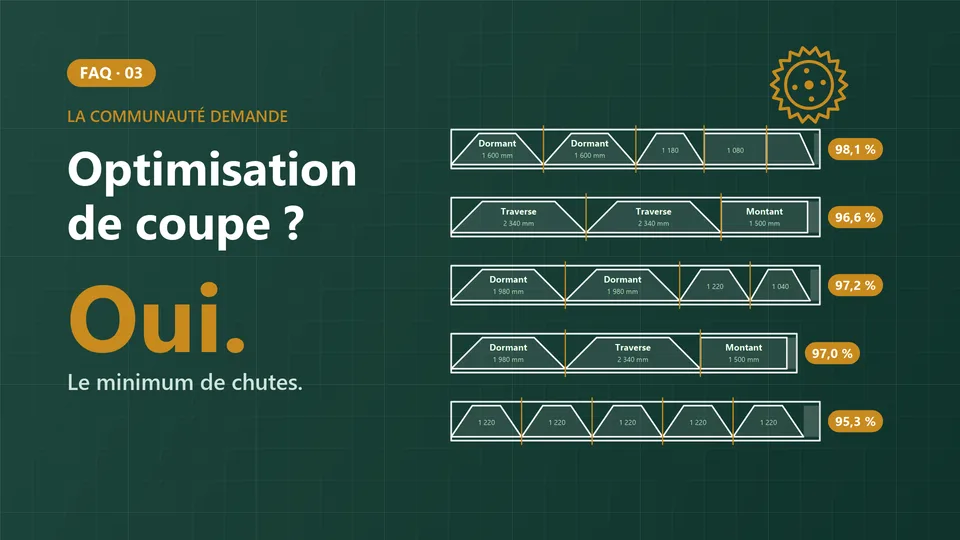
The software chooses the best bar lengths between a minimum and a maximum that you set. The summary shows the bars used, the total offcut, the offcut rate and the average utilisation, here for a demo project.
- Bars used
- 415
- Average utilisation
- 95.3%
- Offcut rate
- 4.7%
Available lengths
Several lengths of the same profile are combined, for example 6,000, 6,400 and 7,000 mm.
- Bar
- 6,000 mm
- Bar
- 6,400 mm
- Bar
- 7,000 mm
Limited stock
You enter the quantity available for each length. A piece that cannot be placed is flagged, with the reason.
- Piece not placed
- Too long
- Piece not placed
- Out of stock
Fewer offcuts, and offcuts you can reuse
With the “minimum offcut” setting, the offcut is either close to zero or long enough to be used on another job.
- Cutting worked out by hand
- 12-18%
- With CUTTER SOFT optimisation
- 5-8%
Cutting plan and sheets for the workshop
Bars used, pieces cut and offcut, bar by bar, with identical bars grouped together: the workshop has everything on paper.
- Cutting plan
- Production sheet
- Bar drawing
Export to your cutting machine (option)
OptionThe optimised cuts go into a file for a double-mitre saw or a cutting centre. Four presets are supplied, and the format can be adjusted: separator, units, columns. See it in a demo, on your own machine.
Aluminium and PVC: kits, add-on profiles and reinforcements included
The profiles from kits and add-ons go into the cutting plan alongside those of the frames. In PVC, steel reinforcements are added according to the rules of your profile system and are optimised like any other profile.
Roller shutters are cut in the same way: slats, guide rails and tubes, on your bar lengths.
Videos: cutting optimisation in practice
Short videos in French, with the software on screen.
Frequently asked questions about aluminium cutting lists
Is there free aluminium cutting list software?
You can try CUTTER SOFT free for 15 days on your own jobs. It is then sold as a subscription or a lifetime licence, with an offer made on request.
Can I use my offcuts and my stock?
Yes. In limited stock mode, you enter the quantities available for each bar length, and reusable offcuts go into the optimisation above a threshold you set.
Which cutting machines does it work with?
The machine export (option) produces a file for a double-mitre saw or a cutting centre. Four presets are supplied and the format can be adjusted: separator, units, columns. Show us your machine during a demo.
Are roller shutters included in the cutting lists?
Yes: slats, guide rails, tube and bottom slat are cut and optimised like any other profile, on your bar lengths.
